Browser Fingerprinting Protection: How to Stay Private
Your online privacy is under siege from sophisticated tracking techniques that profile your identity without using cookies. Browser fingerprinting has emerged as a stealthy form of surveillance that monitors your web activity based on your device’s unique configuration. This guide examines the browser fingerprinting threat and proven techniques to guard your anonymity in 2023.
What is Browser Fingerprinting?
Websites can compile dozens of data points about your browser, operating system, and hardware – from screen size to installed fonts – to create a distinctive fingerprint to identify and track you:
“A crazy string of text called User Agent reveals a lot about your browser…After a while, our font collections start to diverge.” – Neil J. Rubenking, PCMag
Without using invasive cookies, fingerprinting allows companies to follow you between sites by matching your browser signature. It provides high accuracy for ad targeting and fraud prevention, but facilitates surveillance without your permission.
Latest Browser Fingerprinting Techniques
Innovations in browser fingerprinting continue to undermine privacy protections:
- Stylistic fingerprinting: IBM researchers found machine learning can identify users by their preferred fonts, page styles, and other render preferences.
- Sensor fingerprinting: Studies show smartphone accelerometer, gyroscope, and magnetometer sensors produce unique measurements allowing tracking regardless of privacy safeguards.
As methods advance, so must defense strategies to prevent unauthorized profiling based on your browser signature.
Nothing Private
“Nothing Private” Are you anonymous?
Nothing Private is a proof of concept demonstrating that private browsing or incognito mode doesn’t guarantee anonymity. It uses browser fingerprinting through Client.js to track users. When visiting the project’s website and entering a name, it saves the browser’s fingerprint and name in a MySQL database using PHP. Revisiting the site in private mode still reveals the saved name, showing that the browser can be uniquely identified despite privacy measures. This project educates users about the limitations of private browsing in protecting online identity. Are you anonymous ?
- Visit http://nothingprivate.gkr.pw and enter your name
- Click the “See the magic” button
- Visit the same website in Private browsing / Incognito mode
- See the magic ⭐ at Nothing Private
Is Your Browser Fingerprintable?
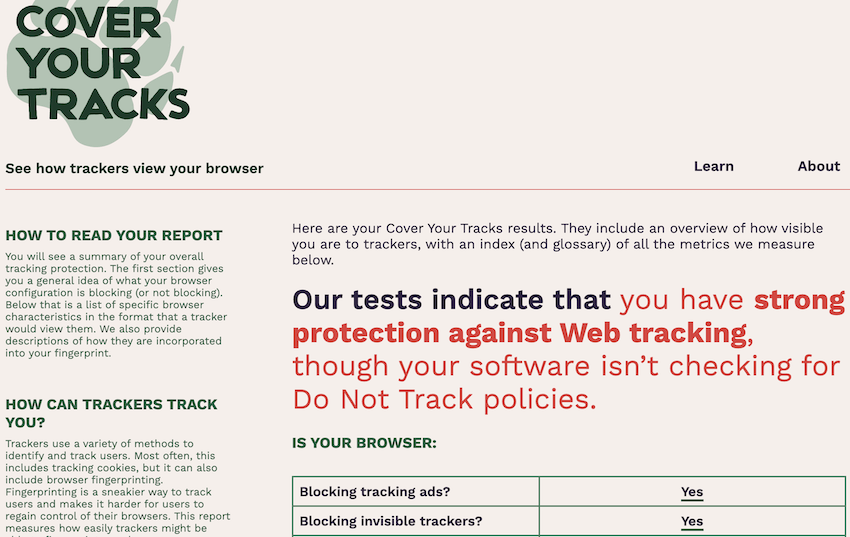
You can instantly check your browser’s fingerprint uniqueness at sites like:
For example, AmiUnique reported my Chrome browser had 1 in 286,777 fingerprint uniqueness. Such a distinctive signature allows precise tracking across the web.
How Website Fingerprinting Works
Websites don’t maintain continuous connections with your browser. Instead, many small interactions exchange information:
- Browsers volunteer extensive details on each visit, including:
- Device type
- Operating system
- Browser version
- Screen resolution
- Installed fonts
- Enabled plugins
- Timezone
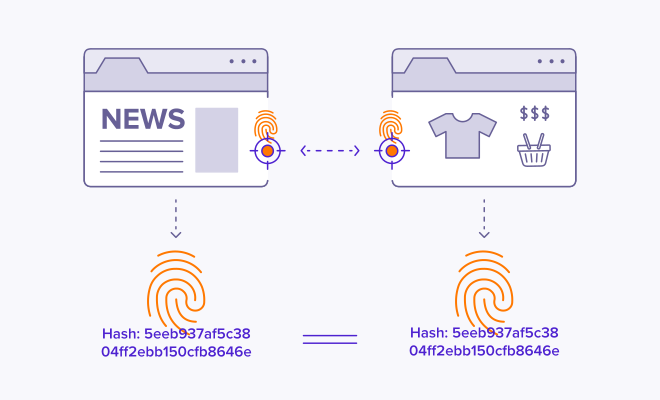
- Sites collate this data into a distinctive fingerprint value for your browser.
- When you return, sites match the fingerprint to associate your web history.
This allows building detailed user profiles sans cookies and powers surveillance advertising.
Your digital fingerprint, or hash, follows you around the web.
Latest Browser Fingerprinting Protection
All modern browsers now provide settings specifically blocking browser fingerprinting methods:
| Browser | Fingerprinting Protection |
|---|---|
| Safari | Prevents cross-site tracking |
| Firefox | Blocks known fingerprinters by default |
| Edge | Tiered tracking prevention levels |
| Brave | Randomizes / blocks fingerprinting techniques |
| Chrome | None built-in, extensions required |
For example, Firefox and Brave automatically obstruct common fingerprinting vectors like canvas, WebGL, and font enumeration attempts.
However challenging the evolving tracking landscape, proactive precautions can help safeguard your digital fingerprint from misuse.
Expert-Approved Privacy Tips
Cybersecurity experts recommend a layered privacy approach combining browser protections, VPN encryption, and device configurations:
“The more defenses you put in place, the stronger you’ll be when it comes to defending yourself against surveillance” – Jamie Cambell, Norton Labs
- “Use the Tor browser when possible for maximum anonymity.” – Roger Grimes, KnowBe4
- “Disable location services and microphone access across all apps and devices.” – Lisa Forte, Red Goat Cybersecurity
- “Routinely clear cookies and browser data to prevent tracking between sessions.” – Lesley Carhart, Dragos
Compiling quote
Small daily precautions equip you to take control of your online privacy as data harvesting techniques progress.
Advanced Fingerprint Spoofing Tactics
When default browser settings still expose excessive device details, specialized tools take obfuscation further:
- Block scripts/APIs: Browser extensions like uBlock Origin prevent invasive code gathering data.
- VPN encryption: Masks IP address and routes connections through remote servers to hide origin.
- Anti-fingerprinting apps: Avast AntiTrack and Norton AntiTrack feed fake system data to thwart profiling.
- Operating system tweaks: Limit app permissions and device access to sensor data like biometrics and location services.
Get ahead of advances in browser fingerprinting by proactively protecting your digital identity through these best practices.

The Future of Fingerprinting Privacy
Despite escalating fingerprinting sophistication, protect yourself by:
✔️ Selecting privacy-centric default browser settings
✔️ Using a reputable VPN and antivirus suite
✔️ Monitoring your browser’s data exposure
✔️ Routinely clearing browsing histories
Adapt along with the threat landscape to retain control over your online anonymity. As stewards of the public interest note:
“The advertising industry has proven over and over that it cannot regulate itself. That’s why we need lawmakers to step in…”
Until comprehensive legal protections emerge, individual actions to minimize browser fingerprinting risks remain critical to navigating the web unseen.